2024
Product Design
AI Integration
Hardware
Launched
Design
UniFi

Product
AI-powered design for enterprise security hardware, elevating security workflows. Focused on:
-
Natural language video search
-
Scenario-based intelligence
-
A foundation for scalable, real-time AI monitoring
Design Goal
-
Explore “recognize everything” for smarter security workflows
-
Translate AI potential into clear, usable experiences
-
Build scalable intelligence from search to real-time monitoring
Team
-
Product Designer
-
AI Engineer
Responsibilities
-
UX & Visual Design
-
Product Behavior Definition
AI-Powered Experiences for Enterprise Security
Physical Security
Context & Challenge
Upgrading from “object recognition” to “recognize everything” opens doors for smarter, faster workflows in enterprise security. Yet it introduces AI ambiguity, hardware constraints, and added user complexity.
Principles
-
Start simple, scale gradually: Begin with clear, accessible scenarios before expanding into advanced use cases.
-
Scenario-centered, not AI-centered: Prioritize real-world workflows over showcasing AI capabilities.
-
Keep the magic, hide complexity: Let AI enhance the experience quietly while reducing visible complexity.


From Ambiguity to Clarity
Initially, the only confirmed feature was natural language search, with unclear AI detection boundaries.
To explore possibilities, we proposed scenario-based onboarding, letting users select environments (e.g., warehouse, store) to preset relevant security events like theft or loitering.

Narrow Down Touchpoints & Design Approach
🪄 Onboarding: Frictionless Start
Designed an intuitive onboarding to help users quickly select and set up new devices, reducing learning barriers and enabling faster entry into AI-enhanced workflows.
🔍 Search: Intuitive Entry
Natural language search replaced filter-heavy clicks, enabling a seamless entry point for all users. Early designs exposing AI tags felt technical; refinements hid mechanics while preserving the “magic” of AI-powered search.

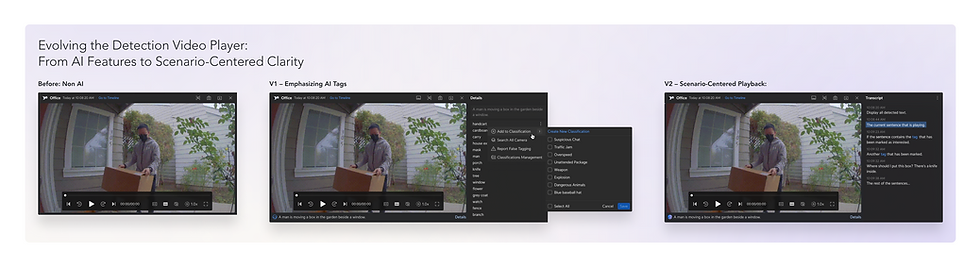
✨ Detections: Enhanced Clarity
From basic playback to AI-powered transcripts, context, and image enhancements, the player evolved to help users find critical insights faster while maintaining a scenario-first experience.

🛡 Alarm Manager: Precision & Prediction
Integrated AI triggers in alarm workflows, evolving from basic keyword triggers to precise, predictive monitoring. This advanced touchpoint enables power users to define customized conditions (e.g., “person with no mask”) for real-time alerts.

Impact & Continued Evolution
-
AI summaries and transcripts for faster, clearer video review.
-
Spotlight tagging of people and objects for prioritized monitoring.
-
Predictive triggers to support proactive security workflows.

Enterprise-Scale Design Insights
-
Start with clarity: AI projects often begin vague; define scenarios that truly matter.
-
Hardware defines scope: Hardware limits clarify priorities and shape feasible, valuable AI features.
-
Scalable for all: AI should expand capabilities while respecting what already works.
-
Preserve the magic: Avoid over-explaining; let AI enhance workflows while maintaining trust.
Reflection
Designing AI for enterprise security is not about showcasing technology, but about quietly enhancing workflows—simply, progressively, and meaningfully—while respecting the environments in which they operate.